5 Ergonomic Home Office Gadgets: Chair, Standing Desk, Lamp & More
Table of Contents
Home offices don’t fail because of a lack of motivation. They fail because the physical setup creates friction: a chair that leaves your back aching by noon, a screen at the wrong height, cables that get tangled every time you move something, and lighting that causes eye strain by mid-afternoon.
The five gadgets in this guide each solve one specific ergonomic problem that affects focus and comfort during a full working day. Every product is available on Amazon, chosen for practical value over novelty, and linked directly so you can check current pricing.
⭐ Our Top Pick
SIHOO M18 Ergonomic Office Chair
The single most impactful ergonomic upgrade for a home office
Your chair is the piece of equipment you use more than anything else in your home office — for more hours per day and more days per year than any desk, monitor, or gadget. Getting it right matters more than any other single purchase. The SIHOO M18 gives you adjustable lumbar support, breathable mesh, and recline functionality at a price point that competes with chairs twice the cost. If your current chair is causing discomfort, start here.
Check price on Amazon →All 5 Gadgets at a Glance
| Product | Category | Key Feature | Best For | Price |
|---|---|---|---|---|
| SIHOO M18 Ergonomic Chair ⭐ | Seating | Adjustable lumbar, mesh, recline | All-day sitting comfort | $$$ |
| Claiks Electric Standing Desk | Desk | Electric height adjustment, memory presets | Sit-stand working throughout the day | $$$ |
| Ambertronix LED Desk Lamp | Lighting | Adjustable brightness + color temp, USB charging | Reducing eye strain + desk lighting | $$ |
| EDJO Wireless Keyboard & Mouse | Input devices | Ergonomic layout, wrist rest, wireless 2.4G | Reducing wrist and hand strain | $$ |
| PAMO Under-Desk Cable Tray | Cable management | Mounts under desk, hides all cables | Eliminating cable clutter completely | $ |
5 Ergonomic Home Office Gadgets
1. The Marvelous SIHOO M18 Ergonomic Office Chair
Your chair is the piece of home-office equipment that affects your body most directly, more hours per day, more days per year than any other item on your desk. An ergonomic chair isn’t a luxury; it’s the difference between a productive afternoon and an aching back by 2 pm.
The SIHOO M18’s adjustable lumbar support lets you position the backrest precisely where your lower spine needs it, which changes person to person and even hour to hour during a long session. The breathable mesh back prevents heat buildup during extended sitting, and the recline mechanism lets you shift position throughout the day rather than holding a single static posture. It adjusts for seat height, armrest height and angle, and headrest position.
This chair consistently punches above its price point in reviews and is a practical starting point for anyone upgrading from a dining chair or basic office chair.
Why SIHOO M18 Ergonomic Office Chair?
- Customizable lumbar support for a pain-free back!
- Recline like a boss for that power nap between meetings.
- Breathable mesh keeps you cool under pressure.
2. Claiks Electric Standing Desk – Your Dynamic Work Oasis
Alternating between sitting and standing throughout the day reduces the fatigue and back strain that comes from staying in either position for too long. An electric standing desk makes this practical: you don’t want to manually crank a mechanism every hour, so the electric motor means switching positions takes two seconds and a button press.
The Claiks desk adjusts across a height range that accommodates most people’s sitting and standing positions, with memory presets that store your preferred heights so you’re not guessing each time. The desk surface is spacious enough for a dual monitor setup, and the frame is stable enough that monitors don’t wobble when the height changes.
For anyone who doesn’t already have a standing desk, this is the investment with the longest-term ergonomic payoff on this list.
Benefits of the Claiks Electric Standing Desk:
- Combat the sedentary blues with effortless transitions.
- Boost energy and focus by standing tall.
- A stylish addition to your ergonomic haven.
3. Ambertronix LED Desk Lamp: Shedding Light on Productivity
Most home offices rely on overhead lighting, which is almost always positioned incorrectly for desk work, creating shadows on your workspace and glare on your screen. A desk lamp that you can position directly where light is needed, at the right intensity and colour temperature for the task, eliminates both problems.
The Ambertronix lamp adjusts brightness across multiple levels and switches between warm, neutral, and cool daylight colour temperatures. Warm light (around 3000K) is easier on the eyes during evening work; cool daylight (5000-6500K) is better for focused daytime work where colour accuracy matters. The USB charging port built into the base means your phone or earbuds charge at desk level without an extra cable run to a wall socket.
Illuminating Features of the Ambertronix LED Desk Lamp:
- Adjustable brightness for the perfect lighting vibe.
- Choose your colour temperature: warm, cool, or daylight!
- USB ports for charging your gadgets (multitasking at its finest).
4. Ergonomic Keyboard and Mouse Combo: Typing Bliss
Standard flat keyboards require your wrists to rotate outward slightly to reach the keys, a position that becomes uncomfortable over several hours of typing. An ergonomic keyboard is designed with a slight split and angle that keeps your forearms in a more neutral position, which reduces the cumulative strain that causes wrist and arm discomfort.
The EDJO set pairs the ergonomic keyboard with a contoured wireless mouse in a single 2.4G receiver connection: one dongle for both devices. A built-in cushioned wrist rest under the keyboard keeps your wrists supported during extended typing sessions. The mouse has adjustable DPI settings so you can increase sensitivity when switching between tasks that require precision and those that don’t.
Why Choose the EDJO Duo?
- Split keyboard design for a natural hand posture.
- Mouse designed to reduce strain – your hand’s new best friend!
- Increased typing speed and accuracy – productivity on point.
5. Cable Management Solutions – Tangle-Free Zen
Cable management is the unglamorous side of home office organization, however, a desk with cables running across the surface and dangling to the floor is harder to work at, harder to clean, and harder to reconfigure when you need to move something.
The PAMO tray mounts under the desk and contains your power strip, adapter bricks, and device cables in a single hidden compartment. From the desk surface, everything simply looks tidy. The tray attaches via screws or adhesive pads, depending on your preference, and the open design makes it easy to add or remove cables without dismounting the tray.
This is the lowest-cost item on the list with one of the most visible immediate impacts on how the workspace looks and feels.
PAMO Cable Management Solution Benefits:
- Say goodbye to the cable chaos under your desk.
- Easily access your cables without the hassle.
- A visually pleasing, organized workspace – minimalism at its best.
Final Word
Ergonomics isn’t about having the most expensive setup. It’s about removing the specific friction points that make working uncomfortable, and doing it before those friction points become injuries or habits that are harder to change.
Pick the one thing on this list that describes the most uncomfortable part of your current working day and start there. The other improvements can follow when you’re ready.
FAQs
Which of these five gadgets should I buy first?
Start with whichever one addresses the most uncomfortable part of your current setup. If your back hurts by midday, the chair. If you work long hours and never move from sitting, the standing desk. If your workspace is too dark or causes eye strain, the lamp. If cables are creating visual chaos and making it harder to focus, the cable tray. The keyboard and mouse are worth considering if you type for several hours a day and notice any wrist or arm discomfort.
Is an ergonomic keyboard worth it if I don’t have wrist pain yet?
Prevention is the main argument. Repetitive strain injuries build up gradually and are far easier to avoid than to recover from once they’ve developed. If you type for more than three or four hours per day, an ergonomic keyboard is worth the investment before symptoms appear rather than after.
Do I need both a standing desk and an anti-fatigue mat?
If you use a standing desk regularly, yes. Standing on a hard floor for extended periods causes foot and leg fatigue that discourages standing, which defeats the purpose of the desk. An anti-fatigue mat significantly extends the comfortable standing time. The ComfiLife mat from our Standing Desk Accessories guide is our recommendation for this.
Can these products be used in a rented flat without permanent installation?
Yes, all five products are either freestanding, clamp-mounted, or use removable adhesive. The cable tray is the only one that offers a screw-mount option, but it also works with adhesive pads. Nothing on this list requires drilling into walls.
Related Reads
- 10 Best Desk Upgrades from Amazon (2025)
- 9 Best Standing Desk Accessories: Anti-Fatigue Mats, Monitor Arms & More
- 5 Best Ergonomic Office Chairs: Tested for Long Hours
- 5 Best Electric Standing Desks Built to Outlast Trends
- Cable Management Tray: 5 Pro-Grade Under-Desk Kits
- Upgrade Your Home Office with Top-Rated Organization Ideas


You May Also Like
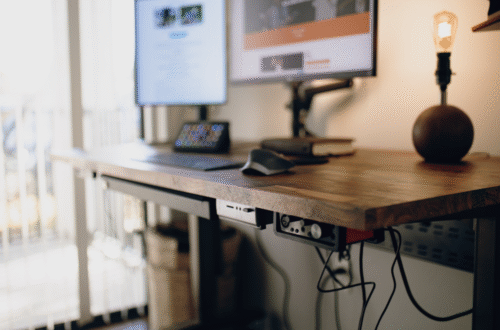
5 Best Electric Standing Desks: Built to Outlast Trends & Last a Decade

12 Home Office Essentials: Best Amazon Picks for Remote Work Productivity